Executive office design: planning a private office for video calls
A private office that works on video calls puts the light in front of you, the camera at eye level, a calm wall behind you and soft surfaces around you. Plan those four things first, then design the room around them.
· Updated · 7 min read
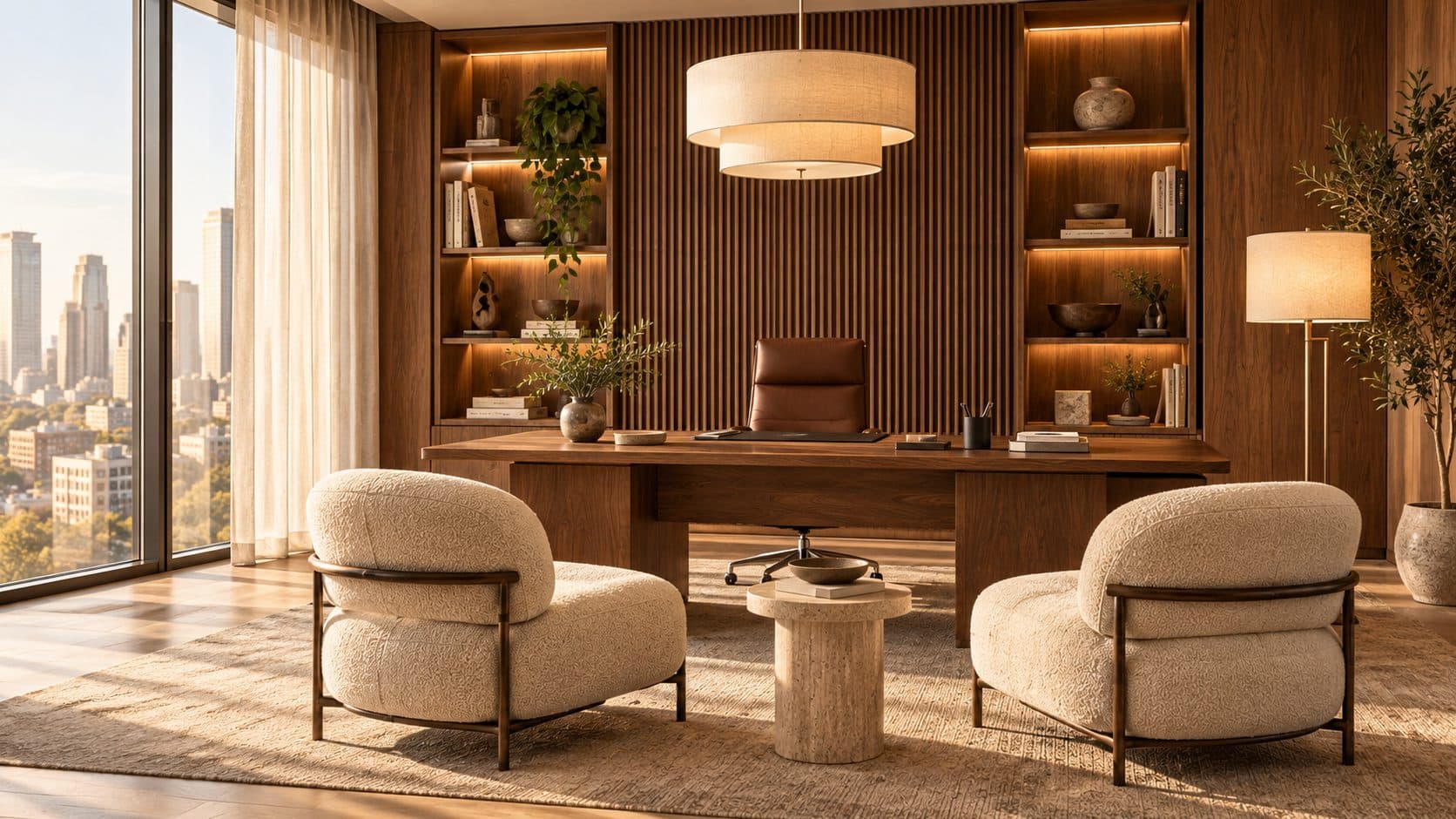
Illustration generated with AI. Not a POA project.
A private office that works on video calls has four things right: light falls on your face rather than behind you, the camera sits at eye level, the wall behind you is calm and considered, and the room has enough soft surfaces to stop your voice echoing. Decide the desk position with those in mind first, then design everything else around it.
For many executives, the camera now sees the office more often than visitors do. The view a laptop camera takes of the room deserves the same care as the view from the door.
Start with where the desk faces
Most executive offices are planned with the desk in front of the window, the chair's back to the glass and the view framed behind the person sitting there. It looks impressive from the door. On a call it is the worst arrangement: the camera faces a bright window, exposes for the sky and turns the person into a silhouette.
Better options, roughly in order:
- Window to one side. Daylight falls across the face, the view stays visible from the desk, and the camera looks at an internal wall you can design.
- Facing the window. Even, flattering light, but the camera then looks back into the room, so the door and whatever sits around it become the background.
- Back to the window, with control. Possible if blinds and artificial light are planned carefully, but it is always fighting the sun.
In Dubai the question is sharpened by orientation. A west-facing office can be pleasant at nine and unusable on camera at four. Ask your designer to look at the sun path for your floor before fixing the desk, and to test the layout at the times you actually take calls.
Control daylight before adding light
Glare and contrast cause more problems than a lack of light. Layered window treatments help: a sheer or screen blind that cuts brightness while keeping the view, and a blackout or dim-out layer for low sun and presentations. Motorised blinds are worth considering when windows are large or hard to reach, but check the building's rules first; some towers control the type and colour of blinds visible from outside, which is usually set out in the building's fit-out guide.
Then add artificial light in layers:
- Soft ambient light from the ceiling, ideally indirect or diffused, so the room never reads as a dark box behind you.
- Face light in front of the desk: a wall washer on the wall you face, a diffused pendant slightly forward of the chair, or a discreet fitting in the joinery. It should be soft and come from roughly eye level or above, never straight down.
- Background accents, such as lit shelves or a picture light, which give the image depth.
Keep colour temperature consistent across fittings. Mixing warm and cool sources makes skin tones look uneven on camera, even when the room feels fine in person.
For the same principles across a whole floor, from desk orientation to blinds and lighting controls, see our guide to lighting an office for Dubai's sun.
Set the camera at eye level
A laptop on a desk looks up at your chin and the ceiling. The fix is simple and worth designing in rather than improvising with books:
- a monitor arm or riser that brings the screen, and its camera, to eye level when seated
- a desk depth that lets you sit at a comfortable distance from the screen, so the frame shows head and shoulders rather than a close-up
- cable routes and power built into the desk or credenza, so nothing trails across the shot
Design the wall behind you
Whatever the camera sees becomes part of how you present yourself, and of how the company is perceived. A good background is calm, has some depth, and says something about the business without competing with your face.
What tends to work:
- Timber panelling or fluted joinery, which adds warmth and texture and also helps acoustically.
- Open shelving with restraint: a few books and objects, lit from within, rather than every award and file.
- A single artwork or a textured surface such as stone, plaster or fabric.
What tends not to work: a glass partition onto a busy corridor, a whiteboard with confidential notes, a bare painted wall, or a strong pattern that distracts on a small screen. Our guide to warm office materials covers the timber, stone and textile palette that photographs well, and the Skyline Executive Suite shows how a fluted timber wall, travertine and lit shelving can frame a desk.
Make the room quiet and free of echo
Executive offices often have hard surfaces everywhere: glass on two sides, stone floors, a lacquered desk. In person they feel crisp; on a call they sound like a bathroom. Microphones pick up reflected sound far more than the ear notices.
Balance hard surfaces with absorbent ones:
- a large rug under the desk and seating area
- upholstered chairs and a sofa rather than only leather and metal
- fabric or timber acoustic panels, which can sit within the joinery or behind a slatted finish
- curtains, which soften both sound and light
Privacy is the other half of acoustics. Confidential conversations need partitions and doors that limit sound passing to the corridor. Glazed fronts are common in Dubai offices; if you have one, ask about acoustic glazing, door seals and where the partition meets the ceiling, since sound often travels over the top. Depending on the building, these details may need landlord approval.
Plan joinery and furniture as one piece
An executive office works best when the desk, the credenza and the storage wall are designed together. Joinery can hold files and personal items out of sight, conceal a small fridge or a printer, carry power and data to the right places, and give the camera a composed background. A bespoke desk can be sized to the room, the screen arrangement and the way you work, rather than the nearest catalogue size. This is where bespoke office furniture earns its place: a few well-made pieces in a small room are noticed every day.
The Bronze Private Office is an example of continuous walnut panelling that hides storage and doors, leaving a few pieces to read as furniture. For the detail of flush doors, open shelf bands and the credenza behind the desk, see our guide to office storage walls and credenzas.
Bring it together in the brief
When you brief your interior designer, say how many hours a day you spend on calls, at what times, and with how many people on your side of the screen. Those answers shape the desk position, the lighting and the acoustic treatment more than any reference image. It is part of how we approach office interior design in Dubai: plan for the way the room is actually used, then make it beautiful.
If the floor also needs a room for larger meetings, our boardroom design guide applies the same thinking to the table, the screen and the camera.
If you are planning a private office or an executive floor, tell us about your space.
Frequently asked questions
Where should the desk go in an executive office for video calls?
Ideally with the window to one side, so daylight falls across your face and the camera looks towards an internal wall you can design. Sitting with your back to a window usually leaves you in silhouette unless blinds and front lighting are carefully controlled.
What is the best background for video calls in a private office?
A calm surface with some depth: timber panelling, restrained open shelving lit from within, or a single artwork or textured wall. Avoid glass onto busy corridors, whiteboards, bare walls and strong patterns.
How do I stop echo in a glass-walled executive office?
Add absorbent surfaces to balance the hard ones: a large rug, upholstered seating, curtains and fabric or timber acoustic panels, which can be built into the joinery. For privacy, also look at acoustic glazing, door seals and the junction between partition and ceiling.
What lighting works best for video calls?
Soft light from in front of you at around eye level, supported by diffused ambient light and a few background accents. Keep all fittings at a consistent colour temperature and control direct sun with layered blinds.
Should an executive office have a separate meeting table?
If you regularly host calls or meetings with more than one person on your side, a small table with a wall-mounted screen and camera usually works better than gathering around the desk. In a smaller room, a well-planned desk with a guest chair may be enough.